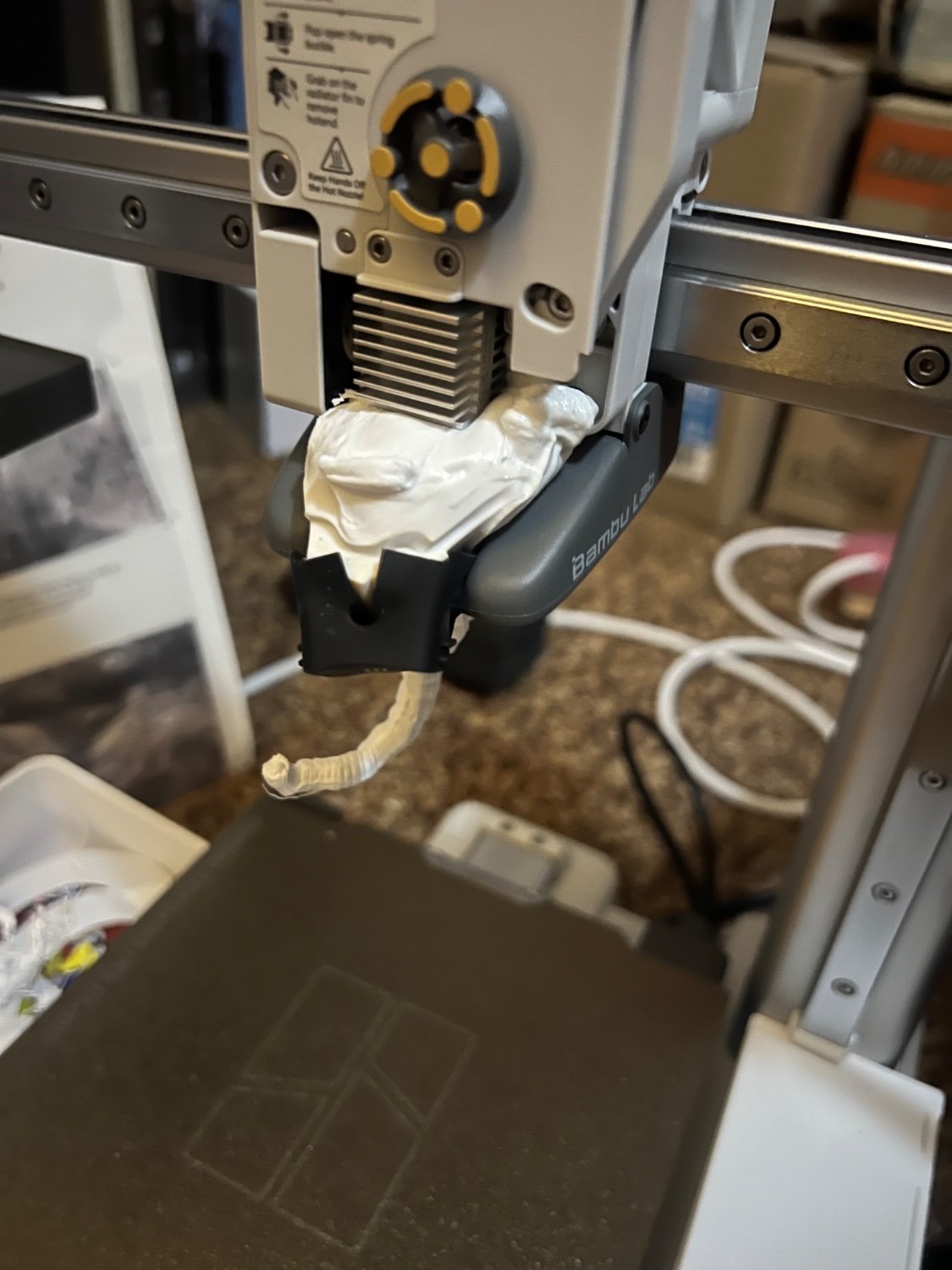
Fourth try on a print. Tried to add some adhesive to the bed to get it to stick better. Watched the first two layers and went to bed. Woke up to a printer on strike.
You must log in or # to comment.
As a seethingly jealous ender 3 peasant who is still spending most of his time keeping my printer working with kludges and duct tape; it’s nice to know Bambu owners are human after all and still run into problems.
Hope you get it sorted and are back printing soon! 🖖
Haha, my ender is printing at 20mm/s to avoid slippage, with the bed scraper jammed into to filament guide to make it actually grab and feed, and at 105% extrusion, but it’s still chugging along. After a few restarts to get the fan spinning, that it.
Manged to get an ender 3V2 a few years ago, auto bed levelling is a must have feature if you intend to spend more time using your printer than calibrating or fixing it. After that masking tape fixes all adhesion problems.
I eventually turned off auto bed leveling because it just doesn’t help much. You still have to manually level the bed, and the correction it adds is kinda negligible. At least the BL Touch does help with the manual leveling process.
@WolfLink @CheeseNoodle I have and Ender 3 S1. On my old CR10 I had similar opinion to you on the bl touch. Since I upgraded the firmware on the Ender some of the new bed leveling stuff has been a handbags. I couldn’t do without it now. Huge reduction in faff.
What firmware are you using? I’ve tried a couple different ones. I think the biggest issue I encounter is the BL Touch measurements seem really off near the edges of the plate, which makes the mesh corrections over correct. I have found the mesh tool helps me manually level the plate better, which is my current workflow.
And that’s just the bed leveling. My extruder keeps clogging to the point that I have to pause the print to do a cold pull multiple times mid-print to get something bigger than about a cubic inch to print. I’m not sure what’s wrong with it. Maybe it’s crappy filament but I’m worried something else is going on.
After that masking tape fixes all adhesion problems.
Well except the one where the print is TOO stuck to the masking tape. I guess that’s less of an issue if you have a magnetic build plate though. I’m still printing on a old flashforge clone. and removing things can sometimes be a pain in the butt.
I’ve had 3 blobs over the years, all caused by an otherwise benign issue turned into that because filament got caught in a silicon sock.
I mean putting a lot of sticky stuff in a sock will usually do that.
I don’t think it’s supposed to do that
Aren’t these closed hardware? good luck finding replacements parts
looks at all the replacement parts that came with both my Bambu printers and the extra nozzles I ordered at the same time
What are you even talking about?
Did they include a new hotend or can you get one? I look on their site and see nothing for that.
Edit: I looked under Spare Parts and they weren’t there, but I see them under Accessories. And for $13, I’d sure as hell buy one when I got the printer. Along with a bunch of other parts, they’re quite reasonably priced.
You get a spare hotend with the purchase of a P1S so I assume they give you one with any of their printers.
You do on the P1S? I’m highly tempted to get one with the AMS, I have several printers that I’ve bought or built over the last 15 years, but even the ones I’ve bought need to be fucked with every time I go to print. The word I’ve gotten is that these are pretty much ignorable and ready to go even after a long hiatus. And an enclosed build chamber for potentially using ABS again is very interesting to me. I stopped fighting with ABS when PETG came out, but it has it’s own set of shortcomings.
Do it. I was in your shoes about a year ago and finally pulled the trigger on the X1C and haven’t regretted it once. My previous printer was like the ship of Thesius with upgrades and still failed all the time. I’ve got probably 700-800 hours on the X1C and have only had maybe half a dozen prints fail and only one repair needed which was covered under warranty. The only maintenance needed has been greasing the screws, which it kindly informs me to do when needed.
I have an A1 and a X1C. Got them because I was tired of my printer being the project and not the actual prints. I was inspired by the guy building life sized Trex models. He highly recommended them. I have about 600 hours on my A1 and about 150 on my X1C. Only time I have issues is when the model is poorly made/badly sliced(so basically user error).
They are basically “set it and forget it”. Setting them up is basically connecting 3-4 cables and 4 screws - incredibly easy.
I could not recomment them enough. I print almost daily now while with my ender I spent more time trying to fix z offsets and other junk.
That’s my exact setup and it’s great. I wouldn’t trade it for any other printer. It being enclosed is fantastic.
It very much is a printer you don’t need to pay attention to. Works as it should out of the box. Only thing you need to do is some maintenance. Cleaning, greasing some rods, etc… It doesn’t tell you when to do it like the X1C (from what I’ve heard) but greasing rods is like an every 3 months thing. All their maintenance on what and when to do it is on the Bambu website.
As it’s my first printer I’m not aware of any issues after a long hiatus. All I can say is that I often don’t print for a month or 2 and it prints just fine when I get back to it.
I’ve only ever had issues with the AMS where it would snap the filament but that has only ever happened when my filament was almost empty and thus very light. I should’ve either weighed it down or welded the leftover on another roll. Plus that doesn’t happen if you’re running out mid print. Only ever happened when I initiated a new print with the almost-empty roll.
Didn’t get one with my x1c.
I got one with my X1C.
Me too.
That’s just not right. I’ll return mine after a years worth of use and get a new one just because of that.
I didn’t get any spare parts with my A1 Mini.
The A1 and the X1C came with lots of extra parts in my experience. Hotend, screws, nozzle wiping pads… And a variety of parts I’ve just printed with the printer itself.
deleted by creator
These nozzles are cheap. And it shouldn’t be very difficult fix this one if you have a heat gun. The hard part will be to get at the latch that holds the the nozzle assembly in the extruder. That’s small, fiddly, and delicate part that there is a good chance of breaking.
So while you are ordering that spare heater assembly, ($20US) you might as well get a new nozzle too, ($10US).
You don’t need any new parts to fix this, though, except maybe a new sock. You just heat up your hotend for a while and it’ll pull off. If it’s too thick, stick the hotend in the oven for a bit.
I just had this happen on my X1C for the same reason and was able to get it off after heating up the hotend for a minute and wiggling it loose. Zero residual damage.
They have all the parts available on their site.
Until they decide not to sell these anymore
So pretty much like every other company in existence? I don’t think there is any danger of BambuLabs disappearing anytime soon and their parts are dirt cheap.
So pretty much like every other company in existence?
Open hardware projects have the parts blueprints published
But you’re still relying on companies to produce these parts for you and they’ll only do it so long as the market is big enough to make it worth it for them.
Open source is definitely preferable, but at this point and time, their proprietary parts aren’t an issue at all as they’re cheap and readily available and with the popularity of these printers, I don’t see it being an issue for quite a long time. By then, I may have moved onto a new printer anyway since the market is constantly progressing.
Time will teach you the lesson
The lesson that all consumer electronics have a limited shelf life? That’s pretty well known.
I can PRINT most the parts. My X1C came with spare part models already downloaded to memory. My A1 contains a bunch of self printed modifications that I found online.
You don’t know what you’re talking about, you’re just fear mongering.
There are already several aftermarket suppliers making parts for them, including a drop-in e3d hot end. Look, I generally prefer open source designs, but the hassle-free workflow with an X1C has been worth it.
Also, they sold a PILE of these things, I suspect aftermarket support will continue even if Bambu stops.
Remember about this comment in 10 years
Ten years… Someone apparently thinks they’re funny. I’d like to see their ten year old 3d printer that is still essentially using stock or equivalent components and hasn’t been essentially re-engineered from the ground up. Are you enjoying manually leveling that bed with thumbscrews and a scrap of paper? Still printing on tape, or maybe a piece of glass? This whole hobby is still moving relatively quickly and I wouldn’t be surprised to wind up working with additional axes or other unpredictable innovations ten years from now. Certainly we’ll have gone through multiple “ultimate” build surfaces by then.
Just because something it’s 10 years old doesn’t mean it’s useless or broken, especially when it’s open hardware and you can upgrade it or repair it. Your mentality seem to be shaped around closed hardware that you throw away once it’s broken or a new model is released.
Nope, you’re missing the point entirely. There’s absolutely nothing stopping me from walking into the other room, tearing apart my X1C and rebuilding it with, let’s say a klipper board, except that it works quite well at the moment… No printer bought right now is likely to be any different in that respect. You’re trying to act like it’s an i-phone, but it just isn’t.
You don’t need to replace anything to fix this, though.
that looks like delicious taffy. like an abba zaba
Nozzle not seated properly?
deleted by creator
I just had this happen too and it was caused by a bad z-offset reading. The nozzle hooked one of the parts on the bed that came loose and drug it around while forming the blob.
How did you diagnose that?
It was pretty obvious because the calibration lines it lays down at the beginning of the print weren’t adhered to the bed, which told me that it didn’t probe the bed correctly to establish the correct height and was printing with too large of an offset.
If you use OctoPrint you can get plugins that use a camera to watch for failed prints like stinging etc and it will stop the print if it fails.
I forget the name of the plugins right now. I went to say “Dr” something.
Removed by mod
Interesting. All of my prints that failed were running overnight when the temperature dropped.
What temps are you running your bed at?
Either 65°C or 70°C
PLA?
Yes
Shouldn’t be an issue then, even when cooler. how’s the adhesion of what’s left on the plate?
Yeah, in some parts of the world, a box surrounding the printer isn’t really a luxury.
Haven’t had problems since I upgraded.
Controlling temperature is important on FDM.
I had this happen. Pop the whole hotend in the oven on the warm/hold setting for a bit and it should come off fairly easily.
Careful not to break the heating assembly thermostat wires. They’re super delicate, and I managed to break them when removing a blob from my mini a while back.
I’ve a massive blob like this one time when the nozzle got clogged and the extruder created enough pressure to push the filament through the threads of the hotend block. It was on an Anet A8 and I ripped a lead off the thermistor trying to get the plastic off so I ended up replacing the entire hotend.
You can try to heat up the hotend to a fair bit under the melting point of the filament to where it’s soft and somewhat pliable but not runny or sticky and then trying to peel it off. Though you’d risk damaging any leads to the thermistor, heater, or your hands if you’re not careful.
Good luck on fixing the printer and getting back to printing again. 3D printing is a really time consuming hobby
Thanks. I am really frustrated with myself for letting this happen. Pulled everything apart and recovered most of everything, but managed to damage the clip that holds the extruder in place, so now I get to learn how to do surgery and replace the entire assembly. I wish I had gotten a bit more time before having to do a major repair…
It’s a learning experience. Is your nozzle torqued to spec? Only time I’ve seen something like this is when the heatbreak/nozzle weren’t set correctly on a v6 hotend, and even then it just oozed down, didn’t consume the entire heatsink. I kept that in my box of learning lol, swapped everything to hotends that are secured so they don’t spin freely after that, was petg so it degraded in the heat and was such a pain in the ass to remove from set screws, was ok writing it off.
Bed adhesion is often caused by surface cleanliness in my experience, some setting will influence it but you’re going to chase problems if your surface has residual oils, some surfaces are more sensitive to it but even the oils in your fingerprints can cause a loss of adhesion. Light dish soap and water is the general recommendation for a degreaser but be aware that this will damage some surfaces, I’ve got some that explicitly want only 99% IPA and another that only wants a clean microfibre cloth.
Drafts can cause an issue too, seen some abs fail becauae I didn’t have the enclosure latched properly and the doors worked their way open with vibrations from printing, I keep mine in my garage and live in Canada, enclosures are a must for me.
OH NO
I don’t see a beginning of a print anywhere, did it not even manage to do the first layer?
If that’s the case, a word of advice to always be present for the first 2 layers of your prints, at least for the longer ones.
I didn’t take the photo immediately - tried cleaning a bit before it occurred to me to document it.
deleted by creator
I had that happen once. it just bout pushed the fan off the head since the clips are broken but it fits good enough™️