
Our relationship with push notifications has been rather circuitous…
- First Andrew (@psychobunny) tried plain desktop notifications via the Notification API (that’s the desktop notifications plugin), but notification delivery stopped when you closed your browser.
- Then I wrote the PushBullet plugin, but they went from free to paid and that went out the window
- Around that time I wrote the Firebase plugin, which was a dead end because there was no iOS support.
- I then wrote the ntfy plugin, which works really well, but does rely on a freemium third-party service and app (written by @binwiederhier@discuss.ntfy.sh)
Thanks to some recent discussion from @crazycells and @bh4-tech, I learned that the Push API had reached general availability across most modern browsers. In fact, this actually happened over a year ago, so compatibility should be even better.
So I set about working on yet another push notifications plugin, hopefully for the last time, and this time using the native Push API on the client-side.
To enable them, simply navigate over to the “Push Notifications” menu item in your user profile, and flip the switch.
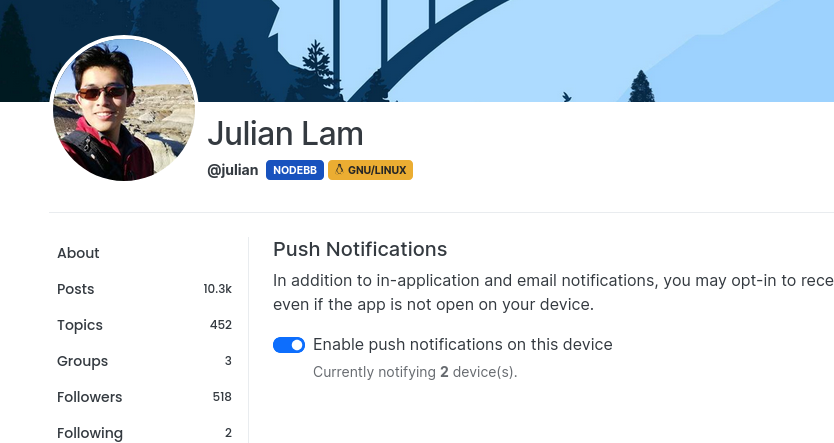
So, let’s dogfood! I de-activated the ntfy plugin on this site and activated the web-push plugin so you can try it out right now.
The plugin is in the proof-of-concept phase, so there might (read: most definitely will be) issues. Please let me know any you find here.
I checked logs: Sever start with log:
info: [plugins/web-push] VAPID keys OK.Nodebb: 4.4.3 Plugin: nodebb-plugin-web-push 0.7.4
it works on: Desktop + Android But I don’t have any permission request popup to enable notifications for Nodebb on Safari Mobile and iOS I tried also with homescreen app in iOS
Can anyone help me? julian maybe it is worth to check this behavior in Browserstack?
Paweł said in Native Push Notifications Support for NodeBB: > julian maybe it is worth to check this behavior in Browserstack?
Yes, this is a good idea 🙂 does browser stack have support for push notifications?
Hi. Just to be certain, push notifications still don’t work on iOS under NodeBB 4.4.4 with nodebb-plugin-web-push 0.7.4, right?
D1re_W0lf mmm it should work but we don’t have Apple devices to test against…
D1re_W0lf Although I don’t have an iOS device, but according to docs,on iOS web push notifications work on only those sites which have been added to home screen. So, add this site to home screen and check after few hours.
On windows you need to enable notifications in the OS settings, it wasn’t working without that for me.


julian thanks for this great addition julian! :+1: sorry for the late reply and “like” flood, I was not able to be around for a while, still catching up on the topics…
julian Thanks a lot. Have enabled push on desktop(Edge) and mobile (Chrome), will report if anything unusual is noticed.
Yes Browserstack use real devices - https://www.browserstack.com/guide/test-push-notifications-on-ios-devices
If you do not receive any push notifications, it is likely because your browser is using an old, cached copy of the NodeBB service worker. You will have to wait for your browser to download the new service worker, or manually clear it.
Secondly, there is one specific caveat for this right now. Users on Safari currently do not use the service worker, and thus will not receive push notifications. This was due to a change in 2021 to work around a Safari bug, but I do not know at this time whether Safari has fixed the issue upstream.
I’m particularly excited about this new development because it opens the door for richer integration between NodeBB and the push notifications themselves.
With (probably) every iteration prior, when you clicked on the notification, it likely opened a new window. With direct access to the Push API and service worker, we can now accurately detect whether the site is already open (in another tab), and open it there.
In the future, we’ll also be able to add in things like icons, pictures, and custom actions, right from the notification itself.
One particular nice-to-have is the ability to update notifications. Being able to merge notifications (like they already do in NodeBB) or potentially rescind notifications would be a nice step forward in usability as well.
julian doesn’t seem to work for me even with cache cleared.
phenomlab clearing the browser cache wouldn’t actually remove the service worker, unfortunately.
It’s proving surprisingly hard to find instructions to teach people how to clear the existing service worker 😝
Chrome, at least, will check for a new one after 24 hours I think .
julian Although I don’t have an apple device, but I think web push will work properly now. I read in some articles that when apple first introduced service workers and push both were half baked, but things have improved with each new release of safari. Maybe, some iOS/macbook user would like to volunteer, by reversing the committ and then reporting the result on their device here. There is one caveat: On iOS, web push notifications work only on websites which are “Added to Home Screen” .
The web-push plugin has now been promoted in v4 beta to “bundled” status, with a corresponding demotion of the ntfy plugin.
https://github.com/NodeBB/NodeBB/commit/aa060d31d130cd54d18cd8dc2f25ba7de58f4fea
julian Is there a link where we can install the v4 beta version of this plugin? I’d love to test it out over on Sudonix.
EDIT - NVM - I found the link…
phenomlab glad to hear you found it :smile:
For those interested in updating, you can just grab the latest commit from
activitypubbranch or perhaps the more the specific commit:git fetch git checkout activitypub # if you're not already on activitypub branch git reset --hard 86f624f8172fb96fbd3c83683affd8814e8b5156`julian I’m using the GIT link you provided to install. Plugin installs fine, but cannot get it to send any notification - even on my mobile device which works fine for NodeBB?
phenomlab There’s not terribly much to configure, just make sure that when you start NodeBB, that you see the output
info: [plugins/web-push] VAPID keys OK.That’s how the messages are encoded to be sent to the corresponding browser push endpoints.
Other than that make sure the user has toggled push notifications on in their settings and allowed notifications for the site.
On Windows, you have to specifically also allow your browser access to send notifications to the user.
julian Yes, I’ve done that, but can’t seem to make it work.
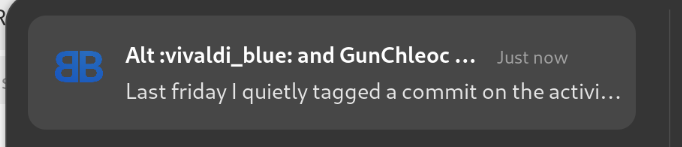
The plugin also successfully removes notifications if they’re no longer relevant (e.g. queued posts that have already been handled), and merges notification content just like it does in-app:

v0.7.0 of the Push Notification plugin has been released
- Notification related service worker code that was initially included in v4 core is now served by the web-push plugin directly, allowing v3.x compatibility.
- Compatibility updated from v4 to v3.10.x
- Meaning if you want to try this out on your existing NodeBB, you can do so by either waiting for v3.10.0, or by updating to the latest commit on the
developbranch
- Meaning if you want to try this out on your existing NodeBB, you can do so by either waiting for v3.10.0, or by updating to the latest commit on the
julian when does 3.10 come out? 😁
phenomlab Right now :laughing:
julian Hmm - still not working for me… :-(
EDIT - works on my Android phone, but not on my PC - guessing it’s likely security software. EDIT 2 - suspicion confirmed. It’s caused by NordVPN. If running, the push notification doesn’t work - if disabled, it works fine.
phenomlab said in Native Push Notifications Support for NodeBB: > NordVPN
Thanks for closing the loop! Kind of annoying that NordVPN blocks them…
This requires me to toggle this on by going to my user’s profile. is there a way this can be made default ‘on’ for all users on platform?
@Pankaj-Soni yes and no… the enabling of the push notifications requires a discrete user action — the user has to actually press the switch to enable notifications.
There are ways we can advertise this to end users, so I will look into adding those soon. For now, users will have to go into their user settings to enable push notifications.
@julian Just like @pankaj-soni , I too would like to have push notifications on by default