

1·
14 days agoDepending on what you’re hosting, tor might be an option, too.
It’s actually intended to make you anonymous; encryption and vpns aren’t (despite what the marketing may say).

Also at @me@social.k3can.us on Mastodon.
Depending on what you’re hosting, tor might be an option, too.
It’s actually intended to make you anonymous; encryption and vpns aren’t (despite what the marketing may say).
And why is a tower defense game listed under Automation?
Has the word “automation” in the description, so the AI just assumed it belonged.
I recently added Anubis and its validation rate is under 40%. In other words, 60% of the incoming requests are likely bots and are now getting blocked. Definitely recommend.

The question is kind of flawed, though. They list Linux, a kernel, in a list of OSes.
Either just list kernels, Linux, BSD, Windows NT, etc; or just list OSes, Debian, Fedora, FreeBSD, OpenBSD, Trunas, Windows Server 2025, Windows XP, MacOS, etc.
Mixing the two together just creates weird results. ¯\_(ツ)_/¯
should it be in NAND or NOR??
Why not both? My initial idea was to flash to NOR and then configure openwrt to a sort of “minimal usable state”. That is, I’d have the basic functions required run my home network: basic routing between local networks and WAN. Then I’d copy that image to NAND and that would be when I installed the “extras”, like SQM and whatnot. That way, if I ever broke it beyond repair, I could just flip the switches and copy the NOR back to NAND and start over with that minimal usable config.
I sort of followed my plan, but I think things have changed enough that it would not be the simple restart that I hoped it would.
I still think it’s a good idea, though.
The Nest ones? I haven’t seen anything online of folks successfully flashing one. The first steps would probably be to solder on a USBC port and see what kind of access you can get over serial. There’s a picture of a Nest board (not the Pro) here, as well as info on what appears to be the correct usb connector. The OP also mentions that the Nest is lacking the developer button, but my guess would be that the function is still accessible by shorting the correct TPs. It doesn’t seem like that OP ever went through with the project, though, so maybe you’ll be the first!
Interesting. Looks like he’s actually using an R4. I’ve got an R3, myself, though. I use mine as my gateway router and it certainly seems under utilized. I’ve got SQM, adblocking, DDNS, DoH proxying, multiple VPN interfaces, and it’s a ‘router on a stick’ for my home networks (at 2.5gbe). Despite all of that, the CPU load never seems to budge and I’m only using a tenth of the RAM. I’m personally a bit torn on the device; on one hand, it certainly seems like it can do a lot more. It even has a m.2 slot for SATA/nvme, so it could definitely provide NAS or even some bigger applications. On the other hand though, I feel like it’s such a critical piece of infrastructure that I don’t want to introduce a bunch of non-router-related functions and risk one of those extra functions crashing the system and bringing down my whole network.
I’m not able to watch the video right now; is this actually using the gopher protocol?
It’s Mastodon compatible, so the best way to follow is through a Mastodon client, like Tusky. Just search for the whole @gale@gts-googlewifi.k3can.us and you’ll see and be able to follow the feed.
Alternatively, you can view the feed online at gts-googlewifi.k3can.us/@gale but it’s not really the intended way to follow the account.
It’s not really “zero trust”, though, right?
Isn’t CF still terminating TLS?
Trying to run a fediverse server on a decade-old Wi-Fi router and encountering some unexpected issues. Making progress, though.
Eh, I agree.
I have root access to the server and can directly interact with the backend DB. Forcing email for a password reset doesn’t protect me from me.
For sure.
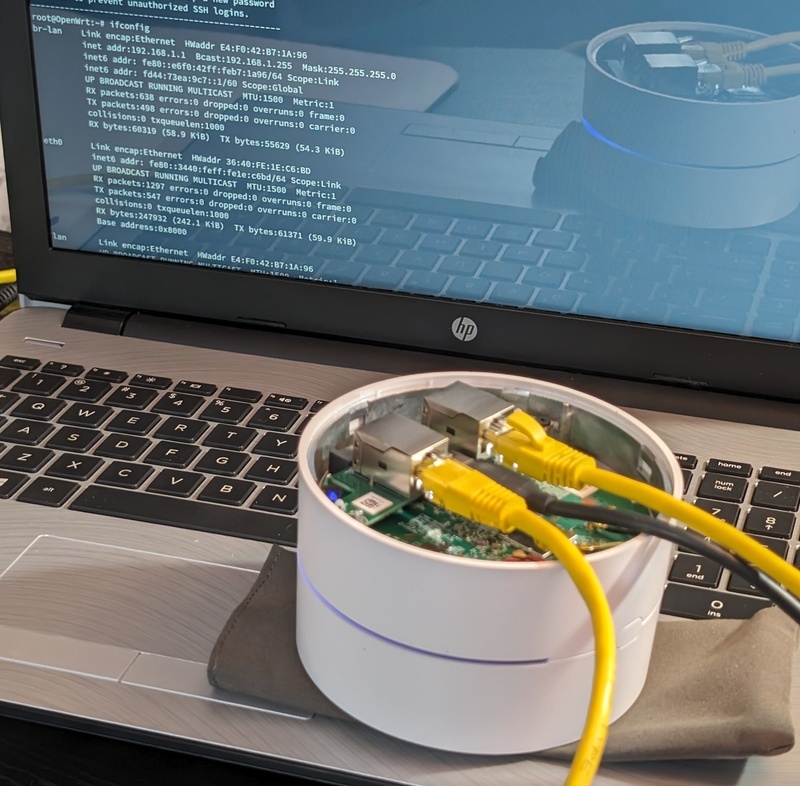
I have several of the Google WiFi pucks, myself. Flashing them wasn’t too complicated, but it does involve disassembly. One of them was my primary router for a while, until it was eventually replaced by a banana pi. It handled the typical routing tasks, plus ad blocking, a VPN, etc. without issue.
Like I said, I believe there’s an nginx package for OpenWRT, serving static web pages should be trivial. If I recall correctly, it only has 8gb of sausage and a half gig of RAM, though. Plenty for a router or static web server, but not a lot of resources for anything too complex. I wonder if you could squeeze a GoToSocial instance in there… That might be fun, actually. I’ve been tinkering with Home Assistant lately, but maybe once that’s “finished”, GTS on a WiFi puck might be my next project. Hm…
Neither the Google WiFi nor an RPI make a good nas server, but either would certainly work. Some routers even have m.2 or USB connectors specifically for that reason.
For a simple web server, there’s even an nginx package for OpenWRT, so you have reverse proxying and basic web hosting on that Google puck with just a couple clicks.
Another interesting possibility is putting a tftp server on your router, and using it as a pxe server.
Plenty of options, if you don’t mind the performance.
deleted by creator

Sounds like you’ve got the right idea.
It’s the bouncer that actually blocks the connections, so your edge router is a great place for it. If you’re sending the openwrt syslog to your security engine, too, you can also catch things like port scanning, which you wouldn’t be able to detect by only monitoring your server or application logs. Don’t forget to actually load your scenarios, though!




Curious what you’re seeing for bugs. I haven’t noticed much myself, but granted I’m probably not using all the features.