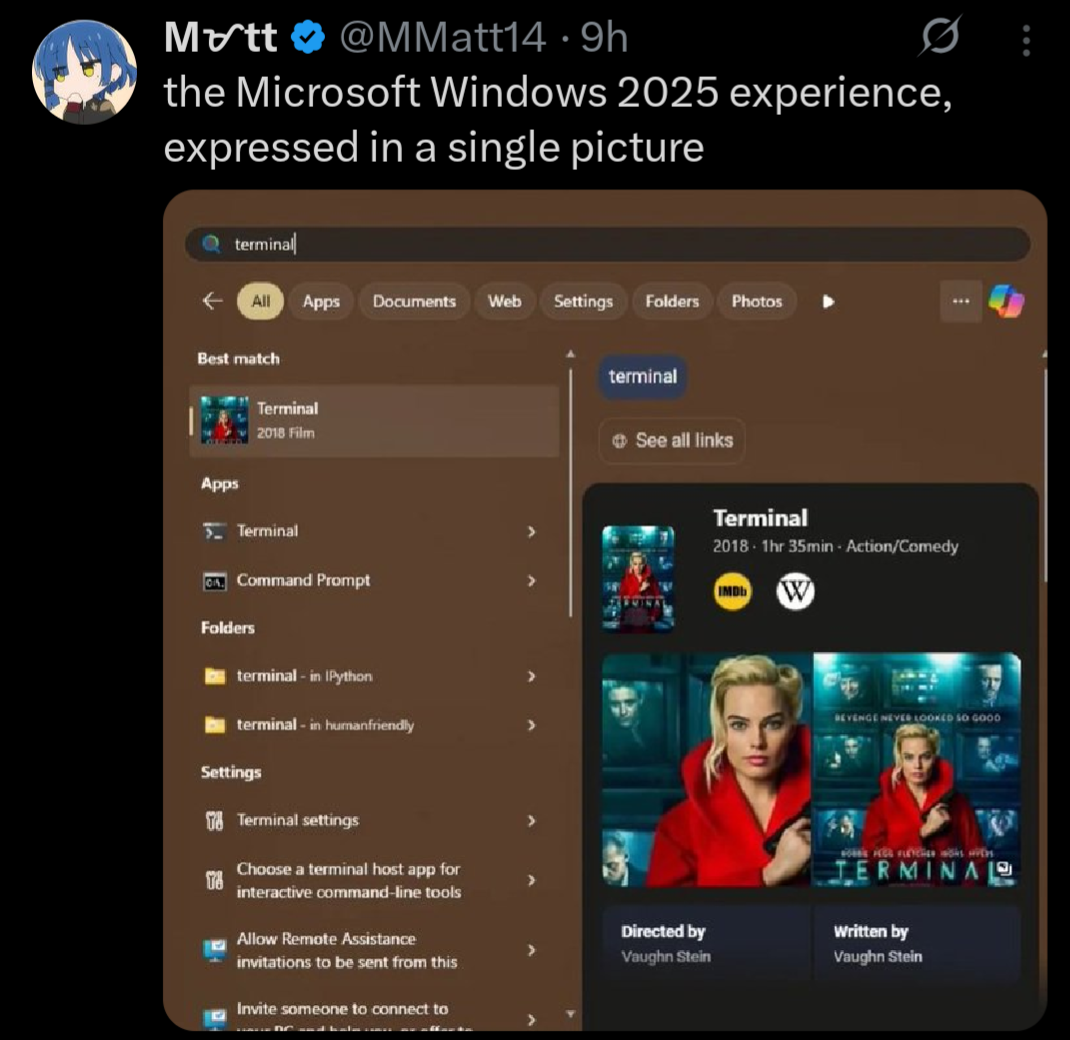
Stop trying to use your computer and get back to consuming damn it. Why are users so difficult!
Seriously, has no one thought of the shareholders!??!
“someone died because the cpr tutorial had 5 unskippable minute long ads”
<joke> you all are worrying about your small problems, but what about John the shareholder? why isn’t anyone thinking of John the shareholder? </joke>
yeah I use tone indicators like html tags, no, you can’t stop me
I remember how the startmenu didnt suck on windows 7 and just worked. Good times. That was also the last time where you could find most of the options in one place.
Like in 2015 i was weirded out how a multibillion dollar company wasnt able to just make a new app for settings with feature parity to the old thing for their major new OS release. 10 years later: lmao.
I have to use a Win 11 machine for work.
If any of you are able to install software on the Win10/Win11 you’re using, install Microsoft PowerToys (Run). It adds a Spotlight-like run/search dialog with a hotkey press that works as you would expect an indexed search to work. I never use the windows start menu anymore due to the enshittification of it.
They can do whatever they want, it’ll be without me.
I’m not saying that my Linux installation was super easy to set up, but once set up, I’ve had fewer problems than Windows.
I for one do miss my system restarting in the middle of some work to apply an update.
You can do that in Linux too! Just put an entry in crontab to reboot the system sometime during your working hours.
thanks, i’ve been missing that feauture.
That’s been my experience too. I’ve been pleasantly surprised by how easy it is to game on Linux. There have been some games where I had some issues, but the same could be said for Windows too. I think the gaming specific aspect is roughly equal between the two operating systems.
The nice thing about Linux though is that when it does go wrong, I am better equipped with the information and tools to be able to effectively troubleshoot and fix the problem. At least, in theory — I am still learning, so I often find myself wading through logs that I don’t understand, with little progress. It does at least feel more empowering though, to have the abstract option of being able to fix my problem, even if I am not able to grasp that opportunity in practice.
Easier than installing and setting up Windows in my experience
Unrelated to that exact image but I’m gonna rant about other windows shit because I feel like it.
Windows decided my page file needed to be 80 GB. I do not want it to be 90 GB. I go to the start menu and search up “page file” to see if there’s a settings menu. First result is a random file in an application’s directory that can’t be opened/displayed by any program on my PC, then a list of other unrelated files.
So I open Control Panel, hoping to find it where I did before, and I click on
System. What do you know, that menu no longer exists, and redirects to Windows Settings. Where do I go from here? Maybe the giantInstalled RAMsection because the page file is just a (overly simplified) method of extending your memory to your disk? No, of course not, that menu’s not actually a menu, it’s just a stat counter.Instead, I have to go to Device Specifications, then the section titled
Related links, then clickAdvanced system settings. Oh whaddaya know? Now I’m in the settings menu that used to be behind the originalSystemoption in Control Panel!Now I’m in the Advanced tab of that menu. But where do I go from here? That’s right,
Performance Options, and then anotherAdvancedtab!!!Then I have to click the
Changebutton, where Windows has… conveniently enabledSystem managed sizeso it could choose to set my page file to 80 GB.I edit, it, hit
Ok, have to hitApplyin the other menu too, have to close out the no-longer-needed Settings and Control Panel windows that only served as a maze to get me here in the first place, and THEN I can restart my computer to reduce the size of the page file, even though it is currently not in use by any program, and all data is in RAM, and the file could reasonably be shrunk by the system at any time.After the restart, this process begins all over again, because this is my third attempt, and Windows automatically reverts back to managing the size itself, and sets it to 80 GB. I have 5 GB of storage space left on my disk.
The descent into advanced Advanced menus really is the cherry on top of this shit muffin.
That’s how you know that what you’re doing is real hacker shit. The secret
Bill GatesSatya Nadella doesn’t want you to know!
As I say, when you’re hunting around for something in Windows and you come across a dialog box that came straight from Windows XP… you’re getting close.
deleted by creator
at this point arch linux is more user-friendly
unironically this
maybe even… what’s that one harder than arch? forgot what its called, think its artix?
copilot fuck off I’m already outsourcing some memory to google (don’t have to remember everything) I’m not outsourcing creativity to you.
All this yes. If you’re actually looking for help, you have to also click “set” after changing the page file settings.
I empathize with this slightly non-ideal situation.
But can you imagine how insane it would be if you were told to do something like copy/paste
swapoff /swap && truncate -s 8G /swap && swapon /swapinto a terminal? TEXT? Like a caveman? The horror! The heresy! How can anyone be expected to do something so complicated! This is entirely unreasonable UX and the reason why Linux is straight up unusable.Btw here’s 15 bazillion commands in a
.psto perhaps disable some of the ads in your start menu until the next time your computer reboots.I agree with the sentiment, and it would definitely make a lot of troubleshooting easier, but you do gotta remember that 99% of people are so non-technical they won’t read anything going into their terminal, or if they do, they won’t know what it means.
You could just as easily replace that with
sudo rm -rf /*and they’d run it just as quickly, and that’s my worry.IMO we should just have settings menus alongside commands for most things any normal user might have to encounter, since that’s just a more user-friendly interface in terms of preventing accidental bad command execution and also just letting people find things on their own without having to look up a command every time if they don’t want to learn a short book’s worth of terminal commands.
The kind of person who blindly runs commands also blindly runs any .exe or .bat they download from github which is not any better.
Of course in an ideal world there’d be a perfect GUI for everything, and we’ve gotten a lot better at that in the last few years. But it’s not like windows is lacking in things that are only configurable through CLI or the registry (which is even more opaque). I’m not saying Linux is perfect, just pointing out the hypocrisy.
While true, copying and pasting is much easier to exploit, especially since websites can alter your clipboard. Not to mention that people are already more wary of downloadable executables, but less so for commands.
For example, I’m not sure if you saw the newer attack vector a lot of scammers are using, but essentially they’ll have a 3-step process saying “Press Win + R” and “Press Ctrl + V” then “Hit Enter”, as a fake captcha, and the site automatically copies a malicious command to their clipboard, which then gets run when they paste.
A similar attack vector could take place where a user copies a command that looks legitimate, hits paste and enter, and only then is it clear that the site copied a new command to their clipboard that isn’t the one on the site they thought they checked.
I do agree that Windows is still pretty shit in this regard though. I just think we should seek to not emulate that as a requirement for users to edit certain settings if we can help it :)
The attack vector of convincing users to do stuff exists regardless of whether a niche GUI exists somewhere to do <the thing>. The only proper defense against social engineering is a) training and b) following the least privilege principle (which neither Windows or traditional Linux desktop’s permission model properly, as the current user in either case has full permissions to retrieve extremely sensitive credentials such as browser cookies without interaction).

Trying to defend against this from the perspective of de-normalizing the CLI is like defending against drunk driving by adding a bittering agent to Guiness beer exclusively.
As for clipboard highjacking, I am well aware, which is why any decent modern terminal emulator should a) strip escape codes by default and b) support bracketed-paste, to prevent immediate execution of a pasted command. If yours does not, please consider switching to a safer alternative (such as kitty).
remember that 99% of people are so non-technical they won’t read anything going into their terminal
That’s a bit ambitious. People don’t like to read anything on their computer. I’ve had people call me over to help with a “computer error” when Word is asking them if they’d like to save their document.
IMO we should just have settings menus alongside commands for most things any normal user might have to encounter, since that’s just a more user-friendly interface in terms of preventing accidental bad command execution and also just letting people find things on their own without having to look up a command every time if they don’t want to learn a short book’s worth of terminal commands.
THIS. As a lifelong Windows user I’d rather deal with layers of shitty GUI, than having to memorise terminal commands and always pay attention not to mistype them lest I fuck my system up.
I can’t switch to Linux yet due to lack of support from my essential programs, but even if it wasn’t for those, I’d still be annoyed if I had to use a terminal to change settings in my system.
IMO we should just have settings menus alongside commands for most things
So like KDE
IMO we should just have settings menus alongside commands for most things
There are - PowerShell.
Changing the size:
$pagefileset = Get-WmiObject Win32_pagefilesetting
$pagefileset.InitialSize = 1024
$pagefileset.MaximumSize = 2048
$pagefileset.Put() | Out-Null
Disabling automatic sizing:
$pagefile = Get-WmiObject Win32_ComputerSystem -EnableAllPrivileges $pagefile.AutomaticManagedPagefile = $false $pagefile.put() | Out-Nullwe do, but better ones would be nice…
yeah this is why i want to never touch windows again
Hmm… Not sure how Linux’ terminal is any better than this, tbh.
Even ignoring all the wacky command names - you have a billion different commands, each doing everything in its own way.
PowerShell is uniform and standardised. This makes learning things super easy. Like, you can’t tell me that you don’t know what’s going on by just looking at the code I posted.
i meant on graphical versions like the settings app could be a lot better
command line/terminal depends on what youre used to and whatnot
It’s not that bad in the GUI as well, as long as you don’t try to angrily fight against change, like OP did.
Go to Settings -> System -> Advanced -> Advanced Settings. You’re already on the old-style dialogue known from the Control Panel days. Two more clicks and you’re in the spot where you can change the page file settings.
People love to shit on Settings, but that’s just weird dudes being angry at change. Control Panel was a chaotic mess. As a guy who worked as first line IT support at the time when Win10 came out, I could not be happier when Settings happened. Everything had a super neat, super easy to follow “route” I could describe to the user over the phone. No need to start describing the difference between the side-bar links, and tabs, and having to click “OK” six times to ACTUALLY save the change you made, because the setting you changed was buried six pop-up windows deep…
If anyone wants a fix for this, yes I know Windows sucks etc, I have to use it for my job:
Press Win + R, type gpedit.msc, and hit Enter.
Navigate to Computer Configuration > Administrative Templates > Windows Components > Search.
Double-click Do not allow web search and set it to Enabled.
Double-click Don’t search the web or display web results in Search and set it to Enabled.
Click Apply and OK.
Windows: where you enable to disable.
… Until the next update enables it again
Job security for the it admin <3 windows cares!
lmao “cares” <3
If this comment was suggesting a Linux command to fix an issue on Reddit, rather than Windows aerobics on Lemmy, it’d have a thousand comments about how Linux is not ready for end users because nobody wants to browse obscure options to fix usability problems.
They still didn’t open a command line
True. They opened a dialogue box that uses a 2007 UI, changed one specific obscure policy, “enabled” the policy to “disable” the feature (how intuitive!) and are now praying it doesn’t reset after a system update. All of that to be able to use search, a feature computers had mastered in 2002. Let’s also hope Group Policy Editor is enabled on their version of Windows.
How user friendly! So lucky he didn’t have to use a command line interface!
I’m not your enemy here, I’m using cachyOS right now, I’m just saying how the layman thinks, and they are deeply afraid of a black screen to type commands.
Win + r and running gpedit.exe is simply a terminal command with extra steps.
I thought gpedit was a command line?
someone please correct me, I’m kinda confused
But we all know that Windows isn’t ready for end users…
Why do people still suggest using Group Policy for this?
It’s complicated for the average user, it’s non-existent for the vast majority (Windows Home doesn’t give access to
gpedit.msc).Just go Search -> Settings -> turn off Web Search, like a normal person. Job done.
That can get reverted when windows updates, the group policy doesn’t
No one on Lemmy should be running Windows Home lol
That can get reverted when windows updates, the group policy doesn’t
I set mine through settings 7 years ago on my laptop. It went from Windows 10 (with all updates) to Windows 11 (and all updates) and it didn’t change.
No one on Lemmy should be running Windows Home lol
Huh? Why not? Is this some sort of elitist cabal where we look down upon people who can’t dish out the extra money for features 99% of the population don’t need? Or are we somehow advocating for piracy for… clout?
Setting can revert, look at this thread. I regret replying, I was mostly joking about Windows Home but he main reason is because it requires a MS account though. Calm down.
Setting can revert, look at this thread
Like, I said:
I set mine through settings 7 years ago on my laptop. It went from Windows 10 (with all updates) to Windows 11 (and all updates) and it didn’t change.
It was around 10 years for my PC, although that didn’t go up to Win11.
No settings changes observed. I don’t know, maybe it’s a regional thing - I’m in the EU.
I regret replying, I was mostly joking about Windows Home but he main reason is because it requires a MS account though.
Well, when your joke sounds exactly like what a lot of people are actually saying, and you don’t add the infamous
/stag, don’t be surprised when someone doesn’t interpret it as a joke.
I wish to run linux but dad doesn’t understand shit about it so I’m not allowed to linux mint (chill im a noob) his laptop but he does want me to flash 11 on it because it’s been used a decade no resets and storage is full. the forced update actually deleted a summary i needed for a book project for school lol
when i get my computer to work, ill linux the thing, whatever i find most comfortable with as a safe distro, multibooted with whatever i’m experimenting with. all i need is a power supply, a case, and an on button
In many if not most cases, you can just add the registry entry for the setting, even in home versions, though to your point, it’s harder than it needs to be.
Really, it shouldn’t be an issue in the first place, but here we are.
Really, it shouldn’t be an issue in the first place, but here we are.
The average user utilises this feature quite a bit (as exemplified by the fact that the feature still exists - the dreaded telemetry is what would tell Microsoft if it was a dead feature). The average user would have no clue how to turn it on (or even that it’s a possibility). The “power user” has no problem turning the feature off.
Which is why the feature is on by default.
I’m skeptical. The average user is an office worker or creator that wants to get their task done and uses search engines of their choice in the browser of their choice for searching, not the start menu, because the start menu opens their query in edge instead of the browser they use.
I’m not convinced.
You know how every now and again the “pro user” community is pissed off because a useful feature gets axed?
That’s because the “pro user” community goes out of their way to fully disable telemetry, which means - according to the data Microsoft receives - nobody is using said features. No point in maintaining something that nobody uses, so it gets the axe.
Web search is not only still around, it’s being developed, and will get extra features in the upcoming updates.
It’s complicated for the average user,
The irony that M$ does this to its users
Group Policy is not intended to be used by average users, it’s for system admins.
Average users have Settings, in which you need to click five times to get the same result as going through GP gives you.
Not sure what’s ironic about that.
… Until the next update enables it again
lol yeah, but to be fair group policy usually doesn’t reset… Until it does. If it were a managed device the domain controller or MDM (Intune) would be resetting it every time you log in so it would stay off but with local group policy you don’t have that kind of guarantee. Strangely to me Intune doesn’t use grop policy and instead uses a separate configuration API that it calls “Configuration Service Providers” that can lock these settings too.
One of the reasons I run linux at home is that I don’t need to do this for my own computer that has been pretty stable on Debian with XFCE going on 20 years (different hardware too, just migrated home).
new linux user here (or trying to be, when i get a power supply, case, power button for frankenstein)
tips? also which distros, de, wm, etc would you recommend (yes im this new, i installed mint twice and grandma thinks its windows, so we’re good. also its just on her 1 computer she almost never touches)
that sort of thing on my work computer pissed me off so much that I finally swapped to Linux on two of my computers at home
I know this is the wrong audience, but you can type cmd into explorer’s address bar and it will launch a terminal in that directory (I think this works with any command in your path)
I’m more of a shift-right click > PowerShell kind of person, but this is good to know
I’m a windows key “cmd” enter person
I still need to use Windows for work so I appreciate it, I didn’t know that one
But OP wanted Terminal, not cmd.exe They’re not the same thing.
type “wt” instead of “cmd” then
Indeed. Also, tried this when I saw it and was surprised that, not only did the Terminal app show up first, but I saw no ads in the start menu at all. Turns out the settings I set on my Windows 11 partition back in 2022 are still there, and I just don’t see stuff like this.
Like yes, I prefer Linux and wish Windows 11 didn’t have so much crap like this, but… It’s so easy to turn most of it off and move on. Changed them once when I set up this machine and haven’t touched them since. Maybe I’m lucky, but I never had an update change back settings, either.
this is actually incredible, thanks
Another option: use windows+r and type the exact name of the executable, the first time, and then it will remember it next time.
Also, can right click on the start menu and then click terminal
 42·3 months ago
I can’t believe the stuff windows users put up with.
It all makes so much more sense when you accept the fact that the vast majority of the population doesn’t know what the Windows Terminal is, but instead can tell you every detail about Taylor Swift’s engagement.
Sorry for your loss. Linux is there for you though.
Eh, people put up with much worse shit than this in the grand scheme of things.
they shouldn’t have to though. windows didn’t used to be like this. it’s sad to see the way it’s been enshittified.
Windows users likely disabled that shit when they first installed the OS and never looked back.
Much the same as Linux users tweak the OS to their tastes.
actually no. most users don’t and they don’t know how to change it, and when they do whether its because they have to or because its annoying and they nearly break the system 3 times, and when they reboot it so the changes take effect, it reverts all changes made
but hey, at least they don’t have to touch a command line or terminal
It started off like you were trying to say something factual but then it became clear you’re completely exaggerating so I have no idea if you even believe anything you said.
And then you finished up with a random dig at people who don’t want to use the terminal. Is this Slashdot in the early 2000s? Why are you shitting on people for using what they feel more comfortable with? Do you have infinite time to get familiar with everything in your life in order to use what, in the long term, is most effective (in your opinion)? Do you shit on people who drive automatic cars for “being afraid of the clutch” or on people who hire someone to install a light switch for fearing to “touch the circuit breaker”?
sorry made that when i was tired and my thoughts can not be coherently put in words when I am tired
it looks like i was trying to be sarcastic/make a joke
i’m also shit at the terminal so no, there is no superiority or anything, i’ll break something if i touch settings or terminal. i was probably trying to make a joke and trying to make it somewhat relatable, but all intent is lost because i don’t know right now
I typed “add or remove programs” which is verbatim the name of the shortcut, clicked enter, and it searched Bing for the phrase.
Windows search bar is useless.
I’m hearing a lotta bitchin’ about Windows and not enough uninstalling.
survivorship bias - those who have uninstalled, are not bitching about windows anymore
Can personally confirm, linux has been such a blissful experience all the frustration just evaporated, no need for such reckless hate.
Certainly it looks like your trying to post a meme on Lemmy 👍🔥 Do you need help with that? Here’s my top memes brought to you by Raid Of Warfare get the new frog togs skin only $4.99.
Would you like to open this in edge? 💪🤔
Would you like to open this in edge? 💪🤔
I spent time over the holidays setting up edge on a relative’s laptop.
One where I could’t enable the play store.
Long story short, he has to run two bash scripts and can use it through a VM with debian 12 with KDE, because I tried to install wine on there last year.
jfc thats stupid
why did they want edge in linux? (if im understanding correctly)
Because he is the star of the hit IRL game “Boomers & Banks”
Someone told him to buy a Chromebook, and then he got a mail from his bank that he had to stop using Microsoft explorer and start using edge instead, so he wanted me to install edge on his Chromebook.
Can’t log in to admin menu, had to launch Linux VM in Chromebook.
DNS kept resetting so i made a script to update DNS and one to launch KDE
wow thats stupid its literally in the name of the device
… Edge is in Chromebook’s name?
no the lack of edge is in the device name
sorry wording while tired is wonderful
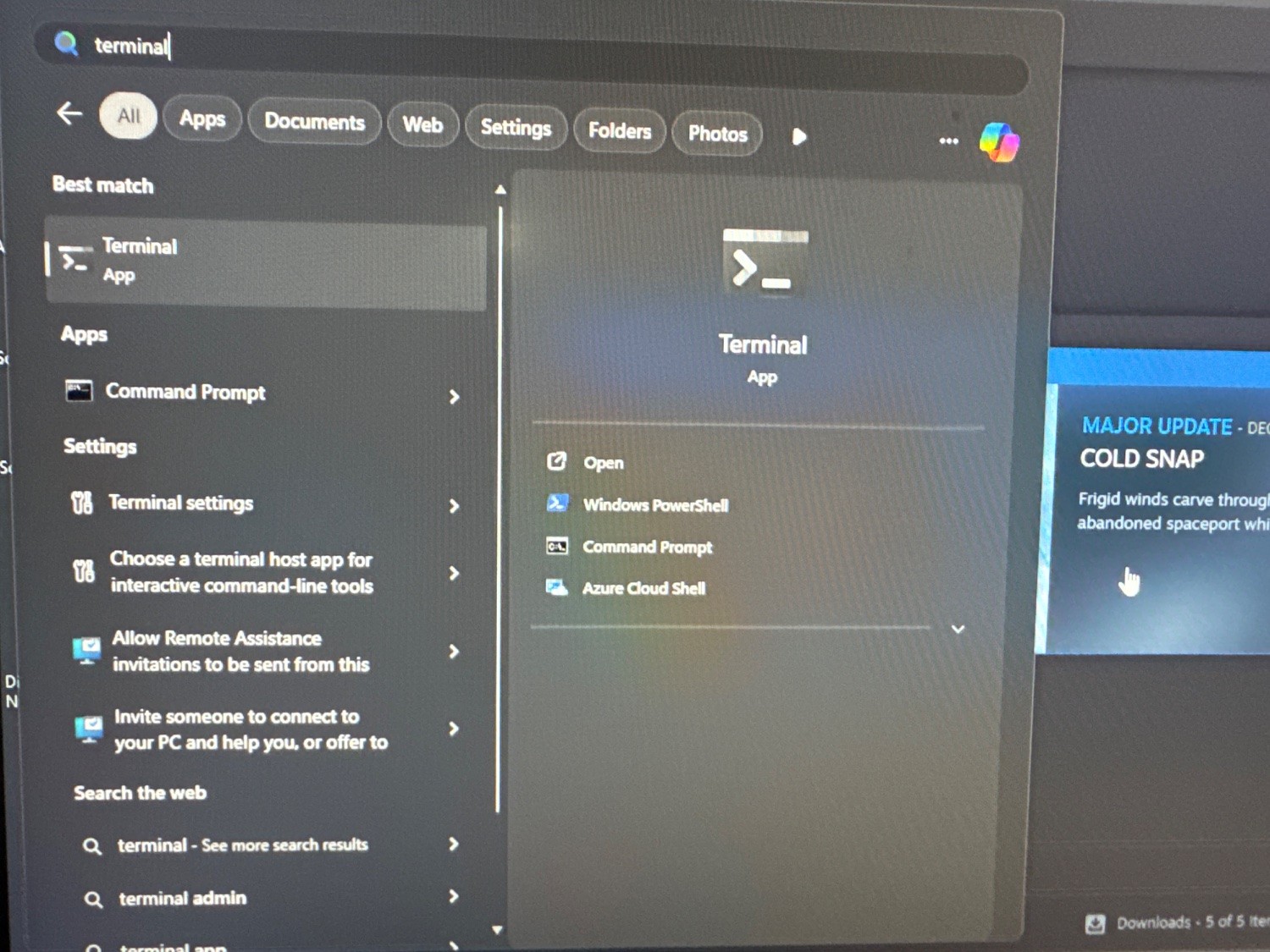
. . . how about that.
This is the same kind of response when someone denies global warming/climate change because they looked outside and the weather around them appears normal.
That’s a pretty wild stretch.
It’s a like for like comparison, although I guess mine was done in 2026 so the meme is outdated.
So in other words, Microsoft saw the backlash specifically about searching “terminal”, so they fixed that one specific bug.
Yes. They cared so much about memes like this that they fixed one bespoke search term.
They’re in a massive PR situation with Windows 10 eol, and clearly an issue with tons of people doing literally everything they can do not switch. Social media is full of people complaining about it, and this goes viral. A simple tweak to the update they were going to put out anyway, and now it cannot be reproduced, so the people who were complaining look like liars.
Is it really that difficult to believe?
I just want to make sure you’re asserting that they went in and hardcoded it so that “terminal” pulls this up?
VS a more realistic “people complained about search and it’s been improved”
Or the real scenario: it’s a meme joke that doesn’t factually represent real life but is instead supposed to by hyperbole.
The techno-tribes asserting nefarious intent for the other techno-tribes is so so so very human.
I believe the claim that Windows search is “indeterminate”, and won’t give the same answer each time. I’ve had things I’ve tried that turned out like that.
My brother, does your keyboard not have a Print Screen key on it?
I don’t use Lemmy or Piefed on that computer.
It’s just for playing games. No other activity.
Doesn’t this just prove that the search is inconsistent though… Unless you’re claiming the original screenshot is photoshopped/faked?
The inconsistencies in the win 11 search as well as the forced advertisements on a device that I not only own, but also built is ultimately what pushed me away from windows on all my devices. I don’t need a search bar that gets confused because it also needs to serve ads that are relevant to my telemetry they’ve collected, just find what I’m looking for and return it.
But equally I’m an engineer by trade, so learning a new OS isn’t a daunting prospect for me, I can fully appreciate that these are issues that wouldnt bother everyone/aren’t significant enough for people to want to make a change.
My claim is that the picture above is a fluke and what it may have been and it has since been improved.
The meme can be accurate, as were now in 2026 and not 2025 so it may have been fixed.
Obligatory “If they choose the ‘Netflix Quick Picks’ route, at least they should recommend ‘The Terminal’ starring Tom Hanks!”
as a linux user (so, genetically superior in every way) i do not have this issue. hahaha…ah.
… sudo app install … a friend?
You forgot to mention that you use Arch BTW.
then it would be
sudo pacman friendor something like that. im not that fluent in arch, but i’m pretty sure
As a Windows user - same. I have no clue where people are getting these screenshots from, I haven’t seen anything like that, ever. Maybe a regional thing, I’m in the EU.
pov you just confessed that you’re a windows user

Extremist fundamentalism of any kind should be considered a mental illness.
sarcasm, however, is a sign of intelligence, as is the ability to recognize it.

flatpak install companion.app 🥲
fuck flatpak
also how do i get it to stop gaslighting me into “i installed it in location” btw it says the place it installed it is real but i can’t find it I think flatpack is lying
sudo apt install friendaww it didn’t work :(
sudo app install … a friend?
sudo apt install fortune
just run that once in a while for jokes. feed it into espeak if you want it to talk to you
EDIT : ‘fortune | tee /dev/tty | espeak’
Maybe it’s my Win 11 Pro or the fact that I took 2 minutes to go to Settings and click a few toggles, but I don’t have any of this. 🤷♂️
A lot of these annoyances can be disabled somewhere in the Settings, but the problem is that there are so many of them tucked away all over the place. Windows 10 (I haven’t used 11) was better than Windows 8 in terms of how unified the settings were, but I remember a few instances where I had to go rummaging through the skeletons in Windows’ closet in order to change some stuff (e.g. having to go through the old-style control panel rather than the Settings).
Furthermore, Windows has the annoying habit of changing settings after updates, and it’s an unnecessary inconvenience to have to go traipsing through the settings again and again to revert unwelcome changes. Even if it’s only the minority of settings that get changed, and if those changes aren’t too frequent, it’s still draining on one’s executive function to make your PC actually behave how you want it to. People get burnt out, and then this contributes to them struggling to find the time and brain to go through changing things.
Mostly though, I am just irked that it’s necessary to go into the settings to turn this stuff off. I am a very techy person, and thus I enjoy tinkering (or perhaps "I enjoy tinkering, and thus I am a very techy person), and stuff like this annoys me so much because I know that I’m in the minority when it comes to willingness to wrestle my tech into the shape I want it. Most people won’t go to that effort, even if it’ll only take 2 minutes — the key thing here is that many of them don’t know it’ll only take a couple of minutes, and I don’t blame them for that.
Good software needs to have sensible default settings. If that were the case, then I think we’d see more non-techy people figuring out what particular settings align with their preferences. As it stands though, configuring Windows to work in a sensible manner is a Task, and the activation energy required for that means that many won’t do it.
I know I have to turn this shit off every time, and I even have a program that reverts my settings in one click. But I still forget every damn “security update” until I notice that fucking copilot is on again. I will never, ever find it acceptable for my changes to be reverted on a regular basis. When any other program fails to keep my settings, it’s a bug and it’s a bad enough one that I usually don’t use the software. But Microsoft keeps doing it on purpose and it absolutely infuriates me that there isn’t more of a backlash.
I really wish I could get more of my stuff working in Linux to make a complete switch. I don’t even need all of it; I’ll give some stuff up.
To turn off Copilot via Group Policy Editor (gpedit.msc) go to User Configuration > Administrative Templates > Windows Components > Windows Copilot. Double-click “Turn off Windows Copilot,” set it to Enabled, and restart your computer.
It will never toggle back on.
I’ll give that a shot, thank you! That will alleviate the latest, greatest annoyance at least.
I’ll still have to run OOSU10 for like three dozen other settings I can’t even remember, but that’s never going to change. It shouldn’t be that hard just to keep your settings.
I really do appreciate the tip, though. I will enjoy having copilot fuck off forever.
deleted by creator
It’s a mess of proprietary software and drivers. Some of it I hopefully can get working, it’ll just take time. I’ve had a friend suggest a windows VM before, so I’ll definitely look into Quickemu and see how much I can manage. I swear one day I shall be free!
deleted by creator
what apps became uninstall-able
Windows 10 (I haven’t used 11) was better than Windows 8 in terms of how unified the settings were
A bar so low we need a geological survey to find it.
even a geological survey wouldn’t find it, the bar is buried below the 9 hells, right under where it’s creator will be
this is a joke plz don’t hurt me ms
A lot of these annoyances can be disabled somewhere in the Settings, but the problem is that there are so many of them tucked away all over the place
Search -> Settings -> “Disable web search” + “Disable suggested apps”.
This is the “all over the place” you’re talking about?
Furthermore, Windows has the annoying habit of changing settings after updates,
I had Windows 10 since day 1 (actually, since day -90, was test-driving it for three months before it went public release) and used Windows 11 since day 1.
Never seen any of this shit, not once.
Most people won’t go to that effort
Most people don’t see an issue and many actually utilise that feature. How do we know this? Because telemetry is a thing and MS hasn’t axed it yet.
Good software needs to have sensible default settings
“Sensible defaults” depend on the target audience. Techy people can turn all of this off, non-techy people won’t think to turn it on. That’s why, by default, it’s on.
deleted by creator
I had Windows 10 since day 1 (actually, since day -90, was test-driving it for three months before it went public release) and used Windows 11 since day 1.
Never seen any of this shit, not once. But, again, instead of fucking around with weird scripts or registry edits, I just disabled web search and search suggestions in Settings, like a normal person.
how dare you not having the same experience as the picture in the ragebait article?
I just tried this and the terminal app is the first thing to show up.
Shhhh… that doesn’t fit the narrative.
Yeah, this is bullshit
How is it bullshit? You clearly see the screenshot.
Let me lay this out for you: you’ve seen a screenshot - which may be real, or may not be, since screenshots are easy to fake - which backs a narrative which you and this service generally buy into. When that is pushed back on you don’t go, “huh, yeah I guess this might not be the slam dunk it’s presented as” but instead dig your heels in.
I booted up a windows machine and checked, and the first suggestion is the terminal application. I don’t know if the difference is due to trickery or misconfiguration, but I do know that it’s not particularly supportive of the narrative that you clearly subscribe to when a bunch of people don’t even get the supposed bad behaviour.
Assuming that all the people who don’t get the same result just turned off some option: my Linux laptop had an issue where it didn’t work properly with monitors behind MST hubs. I spent hours finding an imperfect workaround and dealing with said imperfections until eventually (years later) it was fixed. In comparison, finding and disabling whatever option this might be controlled by takes a few minutes (I assume - like I said, I can’t remember disabling it, if indeed I did, but I’m sure it wasn’t complicated else I would remember)
Now, I still prefer Linux; it’s the right trade-off for me most of the time. But y’all could stand to be less fuckin religious about it. Most people, I would think, would take the 5 minutes to google and disable something they don’t like over the hours of time I’ve wasted for this one issue.
Let me lay this out for you: you’ve seen a screenshot - which may be real, or may not be, since screenshots are easy to fake
I ain’t gonna bother reading any more of your comment than that, because the tone of your first sentence tells me everything I need to know about what you’re going to say. below is the page from microsoft themselves covering the advertisements in windows, specifically saying they will push products and services relevant to the personalized information they have on your usage. the advertisements have been covered by dozens of journalists since early 2024. just because you don’t want to admit it, doesn’t make them any less real. have a nice day.
here’s the Microsoft support page on advertisements. https://support.microsoft.com/en-us/windows/privacy-settings-for-recommendations-offers-in-windows-11-807608ee-3de2-4498-8e7c-eb10d655567f
If you choose to turn on Personalized offers, we will use information about your device and how you use it, including Windows diagnostic data, in combination with your account info and data collected by other Microsoft products and services to offer you personalized tips, ads, and recommendations to enhance your Windows experiences. Personalized offers include suggestions on how to customize and optimize Windows, as well as ads and recommendations for Microsoft and third-party products and services, features, apps, and hardware to enhance your Windows experiences. For example, Windows might tell you about new features to help you get the most out of your device. If you stream movies in your browser, Windows might recommend an app from the Microsoft Store that streams more efficiently. Or, if you are running out of space on your hard drive, Windows might recommend you try OneDrive or purchase hardware to add more storage.
I ain’t gonna bother reading any more of your comment than that
Then don’t reply.
here’s the Microsoft support page on advertisements.
If you choose to turn on
Literally the best-case scenario for you is that you’re incensed over an optional feature.
Now go back and do the bare fucking minimum and read my comment before replying, since that’s what we could now be discussing instead of me complaining about how lazy you are.
Literally the best-case scenario for you is that you’re incensed over an optional feature.
personalized advertising is on by default. you have to opt out, the support page lied on that one detail. turning it off does not turn off advertisements, it just makes them generalized to people in your area because the advertising is not optional. this is pretty basic, and how all advertising platforms work, not just microsoft. and you know that, you’re just pretending you don’t.
Now go back and do the bare fucking minimum
I’m not gonna waste my time reading novels by fanboys just because your feelings are hurt. you’re under no obligation to like that. you can rage and throw a fit if you want, but I’m not going to play your game because I’m under no obligation to humor you in any way.
now, are we done here, or do you want to whine at me some more about how the thing that microsoft announced themselves can’t be true because a corporation would never be mean to you?
fanboys
See, now you’re typing falsehoods because you didn’t bother reading for fifteen seconds. How embarrassing for you.
Can you recreate it?
that’s a pretty silly thing to say, considering multiple technology websites have been posting similar screenshots and reporting on this for well over a year, ever since it was announced the ads were coming. was it bullshit when PC Mag reported on it? when CNET reported on it? when any one of the dozens of other sites did? was it bullshit when Microsoft themselves said they were coming?
it’s bullshit because why? you fanboy microsoft? ok, that’s fine, you’re entitled to your opinion, but ads all over Windows is a fact of life now, and no amount of denial from you is going to change the objective reality. they’ve said they are going to be pushing advertising to more areas of windows. they don’t give a shit if their users don’t want to believe that. they didn’t ask for your opinion on the matter.
Can you recreate it?
I would never subject myself to that sort of enshitified corporate bullshit. I value my time far too much to use windows. so to answer your question, I refuse to debase myself by recreating it. if you’re into that sort of stuff I won’t kink shame you too much, but that ain’t for me, fam.
So that’s a no then
you’re not particularly gifted with an overabundance of smarts, are you?
Here’s what I am gifted with: VMWare workstation pro and a Windows 11 25H2 iso. Just did a fresh install of Win 11 Home, and shockingly enough, TERMINAL IS THE FIRST RESULT FOR TERMINAL IN THE START MENU. No IMDB listing at all. So unless you are gonna to try and recreate the screenshot above, like I just did, STFU.
Not bullshit. I don’t use it other than at work and its constantly doing bullshit like this. Just because you’re not seeing it doesn’t mean it doesn’t happen to others.
So you can’t recreate the screenshot either?
Did I say I can reproduce it reliably or that it happens every single time? It’s obviously an intermittent issue or everyone would be able to reproduce it immediately. I don’t have Windows at home so I can’t even try. But good try, I guess? Don’t believe me, I genuinely do not give a shit.
Seems like you give a big ol shit

Stay mad bro