
This is driving me insane. Please help!
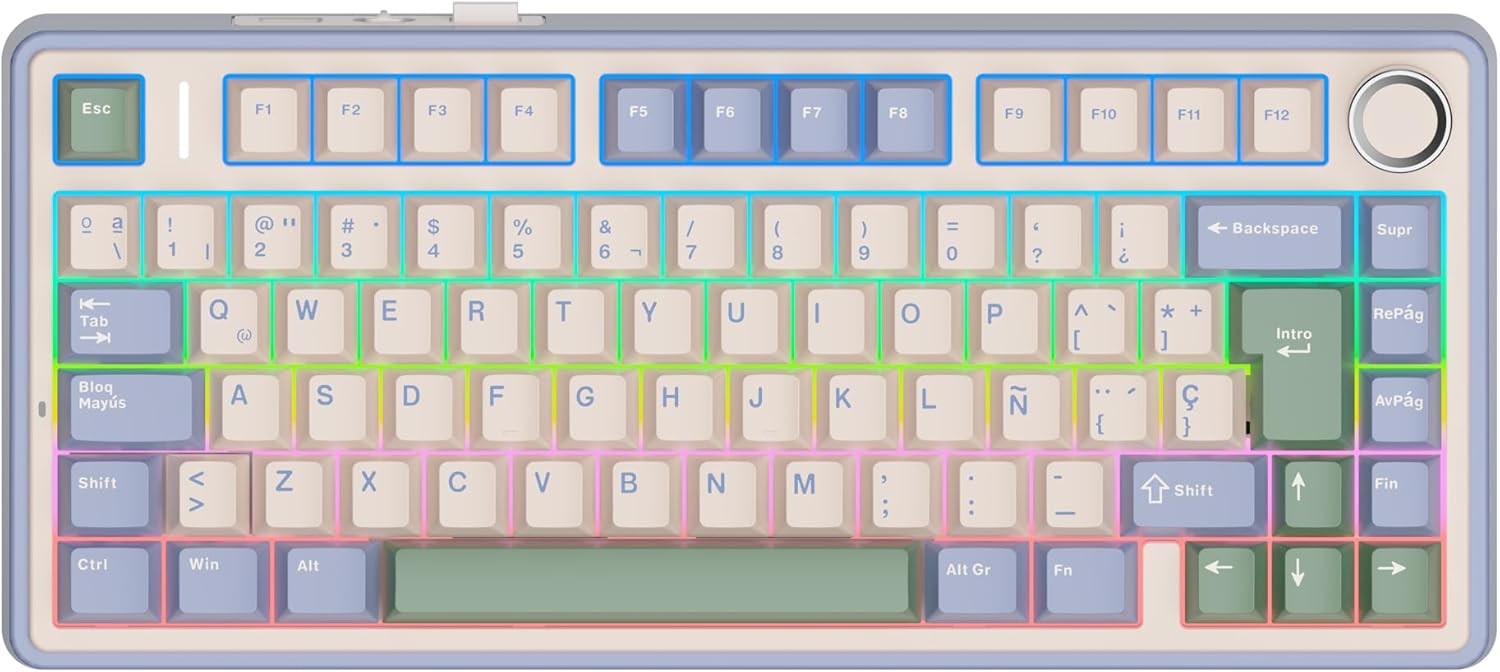
That’s a compressed layout so print screen is missing.
And alt gr + [key] generally gives you the third symbol to the right on the key, behaves like a second shift for the number row, etc
That’s a weird layout, it doesn’t seem a proper Spanish (Spain) layout.
The apostrophe is the button right to the 0, but on the image it seems that is shift+?
The symbols on 1 are correct, but on 2 and 3 seems swapped, like for @ and # is shift+2/3 but in Spain it is AltGr+2/3
EDIT
Definitely OP’s image keyboard is not from Europe, it lacks the € symbol printed on the E.

Isn’t it
shift-??For the apostrophe, yes.
Print screen is usually marked “Impr Pnt” or similar.
Source: I use a Spanish keyboard

That’s shrinkflation for you …
Then it is most likely on the second layer via the Fn key, I’ve seen a couple use Fn-P but check your manual OP
Alt+gr is top right on key
Not familiar with that layout, but just looking at it I see there is a ’ printed on the question mark key, to the right of zero. So try pressing that key in combination with shift, or if that doesn’t work, AltGr.
Print screen, I suspect you’ll have to look up in that specific keyboard’s manual. On a full size keyboard that doesn’t need an Fn key it would certainly be where it is in all other languages. I suspect it is hidden behind a combination with the Fn key but since it isn’t printed on there, I can’t tell for sure.
That’s a mechanical keyboard, so you should be able to map the missing keys to wherever you like.
Failing that, PrtScr is probably on Fn+P, and apostrophes will be Alt Gr+{, Alt Gr+[ or Shift+?. The first two look like they may be accent dead keys, so try Shift+? first, or follow them with a space.
Alternative to print screen is to use whatever screen shot tool is built into your OS (Screenshot on Mac & most sane Linux distros, Snipping Tool on Windows)
That keyboard should come with a manual. Doesn’t it say what do you have to press?
What’s the thing on the upper right corner of the key with number 3? Could it be the apostrophe? Try AltGr+3 and see what happens. Or maybe it’s Meta+3? Meta is the key between left Ctrl and left Alt. You can also try AltGr+Shift+3.
Above the 3 is the punto medio. Its not used in Spanish, but like the ç next to the enter key is it used in Catalán.
Power toys and remap it?
https://learn.microsoft.com/en-us/answers/questions/4098471/how-can-i-change-my-screenshot-hotkey-(from-window
I’m using Linux. I know I can remap it but surely there has to be a more proper way. I would think, anyway.
This is what you want - https://github.com/sezanzeb/input-remapper/
You can just set the layout to US (or whatever you’re accustomed to) and go by memory. 3 keys are different between ISO and ANSI, most characters are where your fingers expect them to be
I know I could do that but that would defeat the purpose of using a Spanish keyboard. I want to type Spanish characters without switching layouts.
Up to you, but personally I’m a European that uses the US layout most of the time as it’s especially nice in a terminal, and have a quick switch hotkey (win-space) to switch over when I need accented characters
I use the terminal a lot and i’m still getting used to the dash key being at the bottom. It’s an adjustment.